Overview
A SQL Join statement combines data or rows from two or more tables based on a common field between them. This article gives a brief idea about different types of Joins such as INNER/EQUI JOIN, NATURAL JOIN, CROSS JOIN, SELF JOIN, etc.
What are JOINS in SQL?
SQL Joins are mostly used when a user is trying to extricate data from multiple tables (which have one-to-many or many-to-many relationships with each other) at one time. The join keyword merges two or more tables and creates a temporary image of the merged table. Then according to the conditions provided, it extracts the required data from the image table, and once data is fetched, the temporary image of the merged tables is dumped.
Large databases are often prone to data redundancy, i.e., the creation of repetitive data anomalies by insertion, deletion, and updation. But by using SQL Joins, we promote database normalization, which reduces data redundancy and eliminates redundant data.
In relational databases like SQL, there are two key fields generally used: Primary Key and Foreign Key. While the primary key is necessary for a table to qualify as a part of the relational database and identify each row uniquely of the table to which it belongs, the foreign key is responsible for linking two tables in the database. Here, the foreign key needs to be the primary key of another table. In some cases, the foreign and primary keys it references are present in the same table. In such cases, we use SQL Self Join. When we use SQL Joins, we often use these two key fields to identify what the user needs and accordingly form our queries.
Build an AI-First Career, Master the Complete Skillset
Choose from our industry-leading programs designed for career success




Example of SQL JOINS
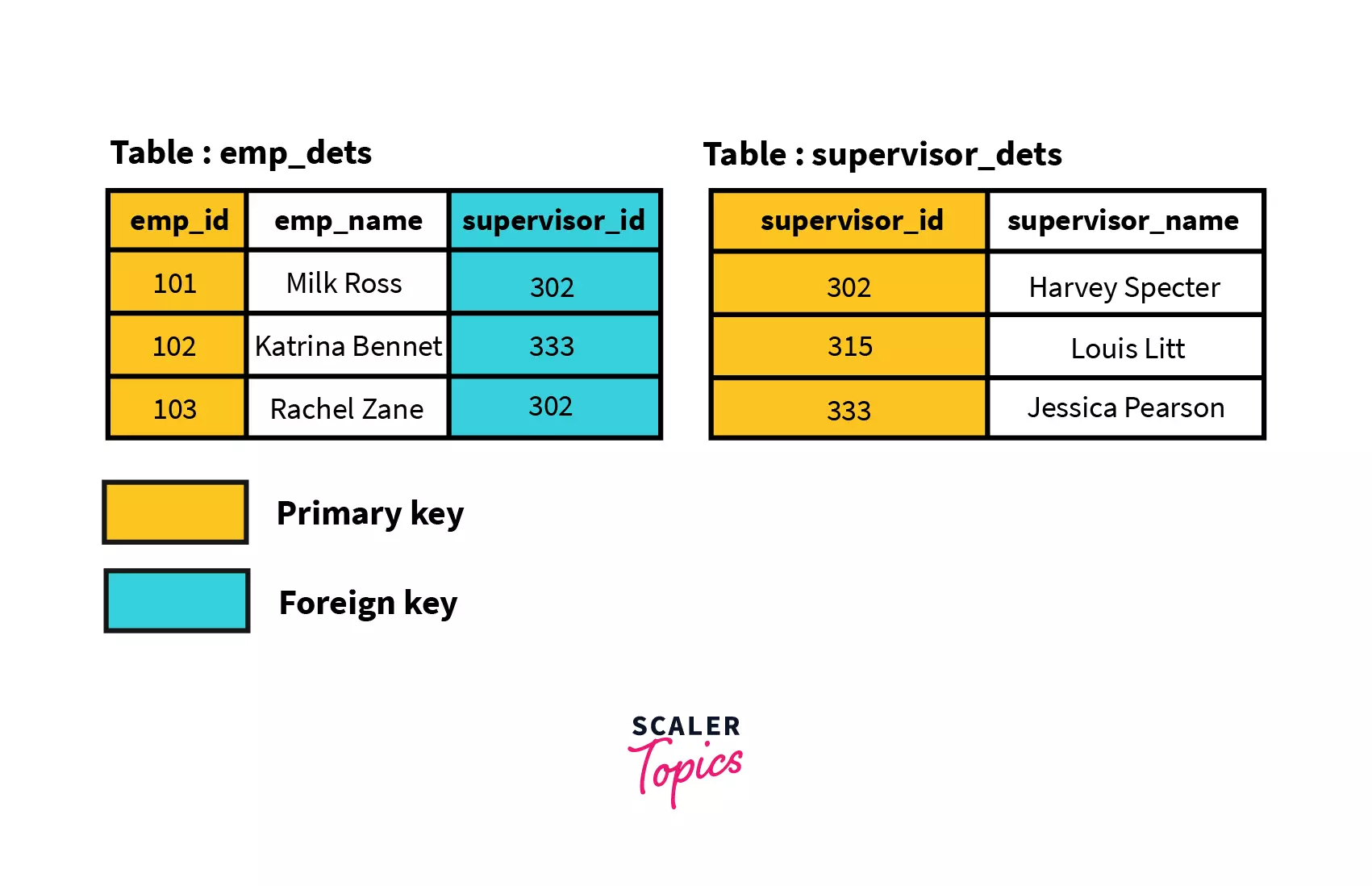
We have a company’s employee database, where Table 1 (emp_dets) contains information about the employee like: employee id, employee name, and supervisor id. Table 2 (supervisor_dets) includes information on supervisors, i.e., their id and name.
Table 1 has emp_id as the primary key, and Table 2 has supervisor_id as the primary key. In Table 1, supervisor_id references Table 2. Hence, it is a foreign key for Table 1.
Depending on the users' needs, there are several types of joins. These joins are broadly classified into four types, i.e., Cross Self, Inner, and Outer.
Types of JOINS in SQL
CROSS JOINS in SQL
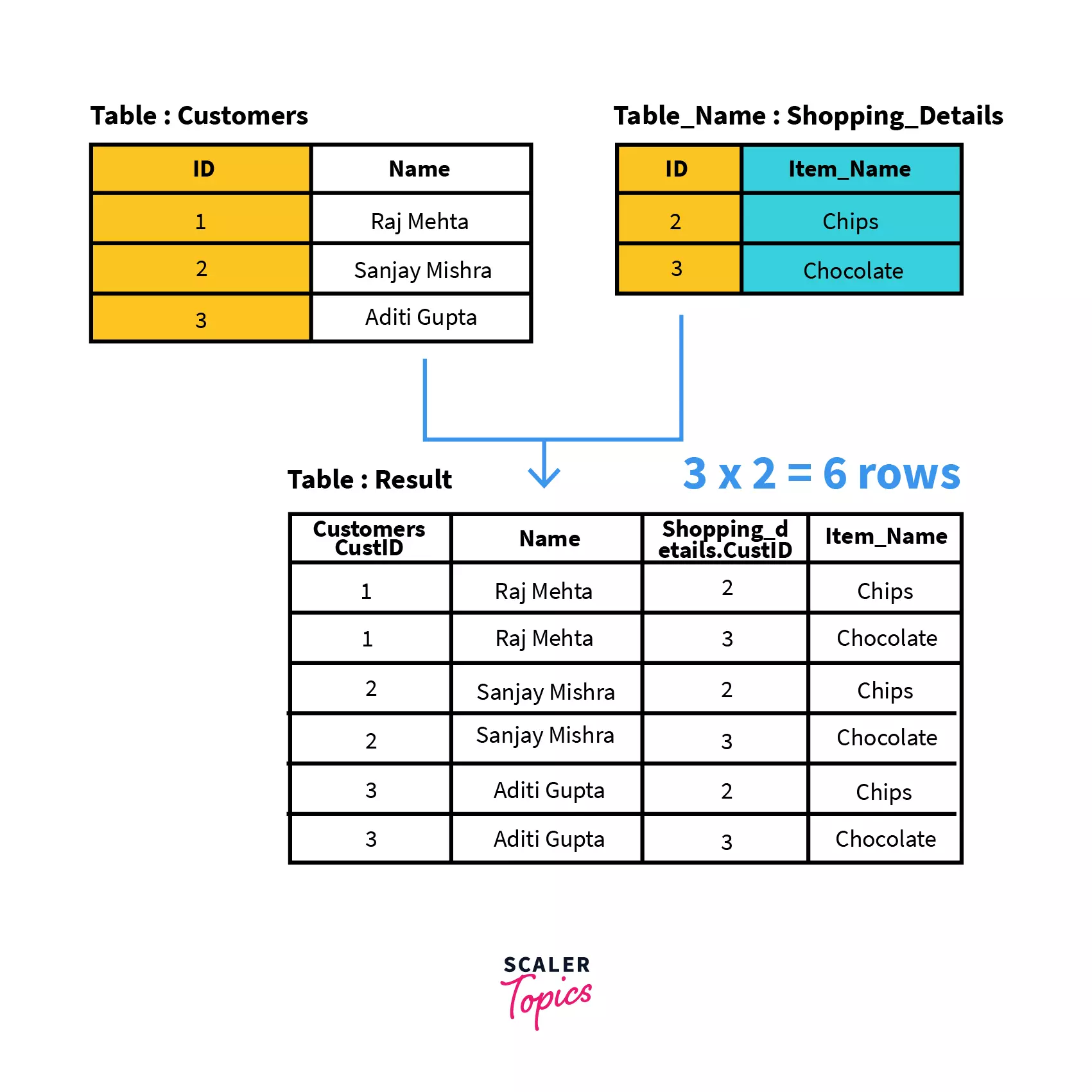
The Cartesian Join, a.k.a. Cross Join, is the cartesian product of all the rows of the first table with all the rows of the second table. Let’s say we have m rows in the first table and n rows in the second table. Then the resulting cartesian join table will have m*n rows. This usually happens when the matching column or WHERE condition is not specified.
General Syntax
SELECT column-name(s)
FROM table1 CROSS JOIN table2;
SELECT is used to specify all columns we need to display in the resulting table. FROM specifies the tables where we need to look for these columns. The type of join, i.e., CROSS JOIN, in this case, is placed between the two tables we wish to join.
Example
Let’s consider the scenario where the first table contains customer details, i.e., customer id and customer name, and the second table contains shopping details, i.e., product id and product name.
Problem Statement
Write a query to give the cartesian product of the Customers and Shopping_Details tables.
Query
SELECT *
FROM Customers CROSS JOIN Shopping_Details;
SELF JOIN in SQL
In SQL Self Join, a table is joined to itself. This means each row of the table is joined with itself and all other rows concerning stated conditions if any. In other words, we can say that it is a merge between two copies of the same table. This is extremely helpful when the foreign key references the primary key of the same table.
General Syntax
SELECT a.column1 , b.column2
FROM table_name a, table_name b
WHERE some_condition;
Here we reference the same table with different names, i.e., a and b. This signifies a SELF JOIN.
Example
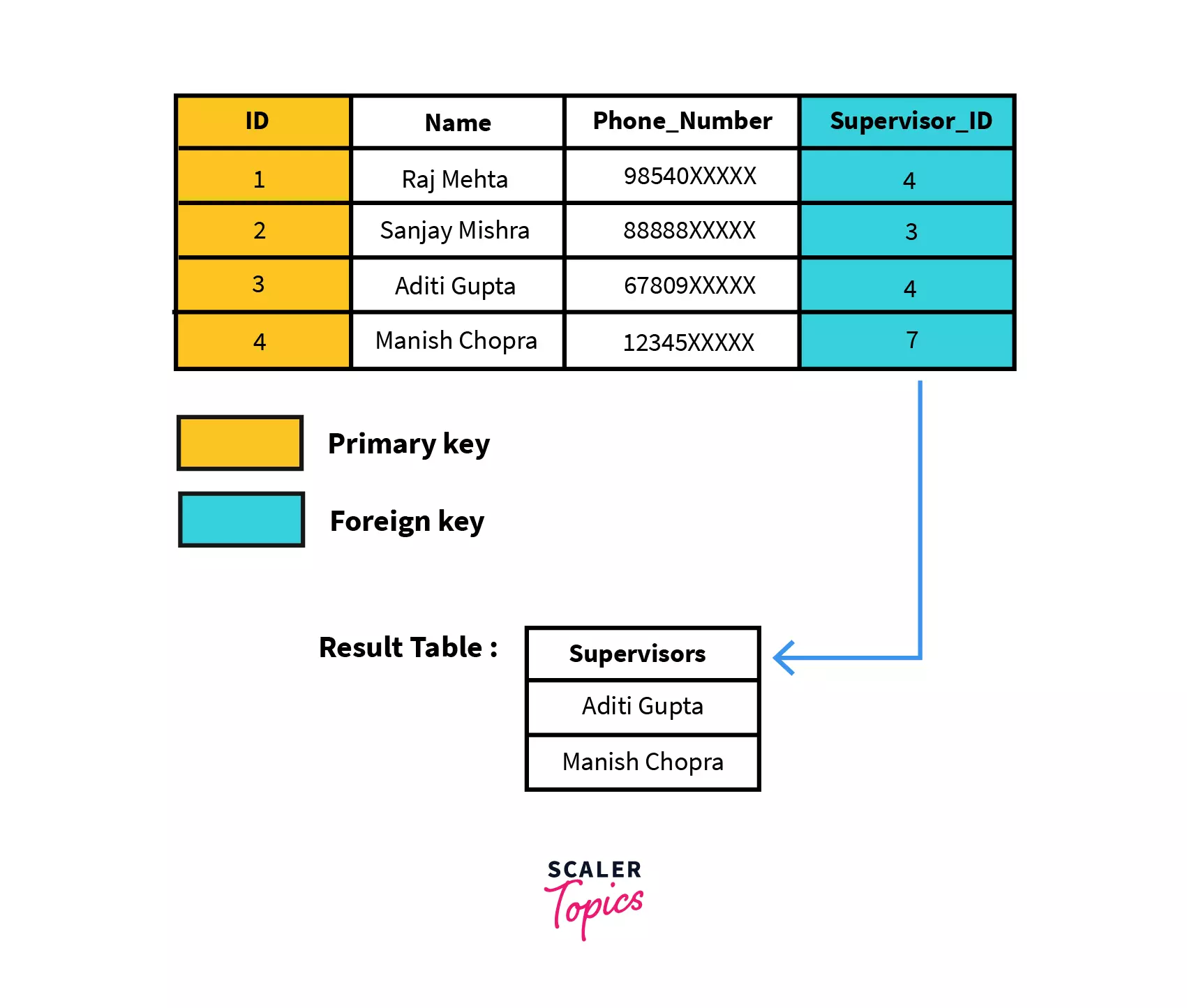
Let’s consider an employee table with the following details, i.e., employee id, name, phone number, and supervisor id. The supervisors are present at the employee table itself. Hence, the supervisor id acts like a foreign key which is also the primary key as it references the employee id.
Table_Name: Employees
Problem Statement
Write a query to get all the employees who are also supervisors of some other employees from the given employee's table.
Query
SELECT a.Name AS Supervisors
FROM Employees a, Employees b
WHERE a.ID = b.supervisor_ID;
Here we use AS to rename the column name of the resultant table.
INNER JOIN in SQL
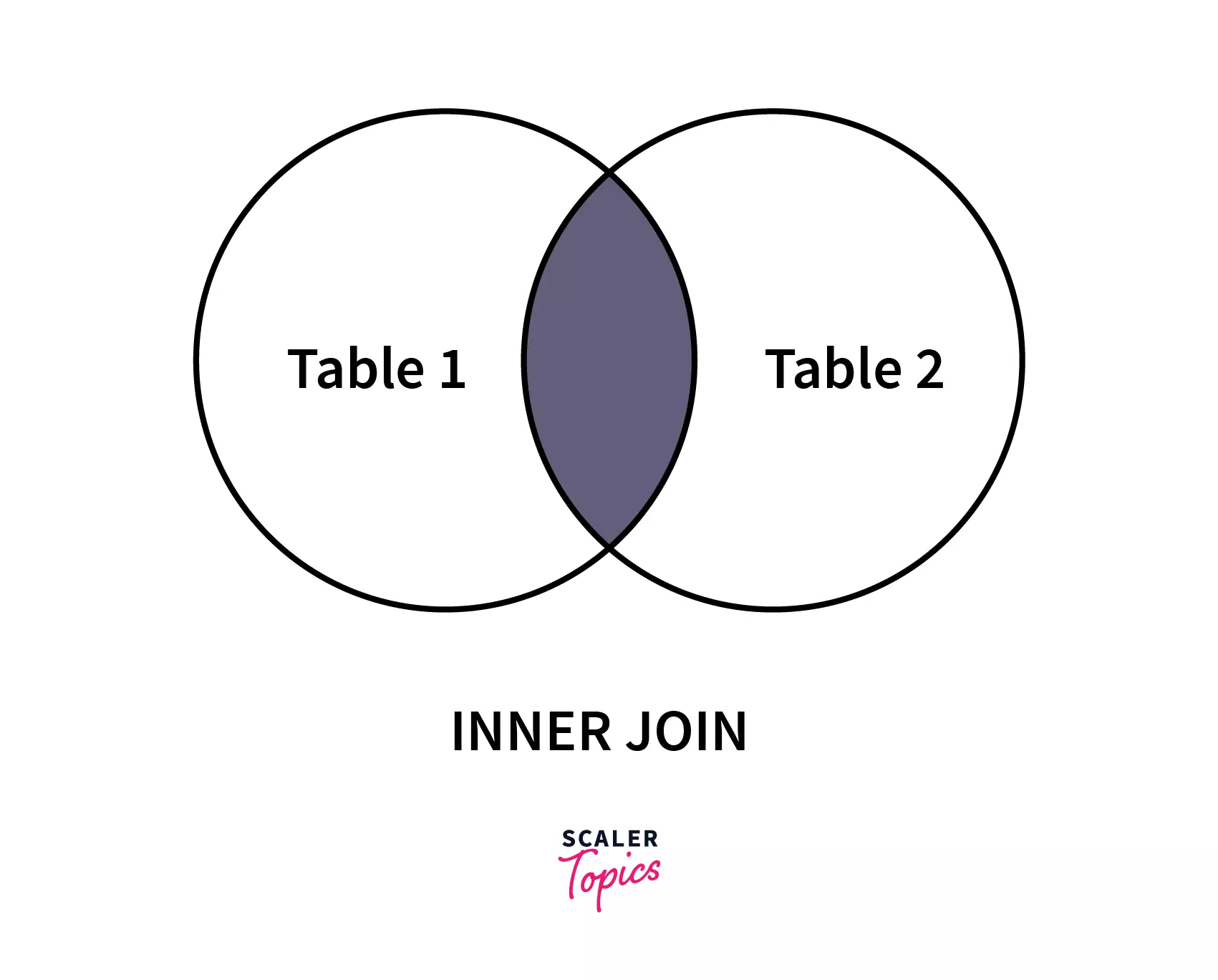
SQL Inner Join or Equi Join is the simplest join where all rows from the intended tables are cached together if they meet the stated condition. Two or more tables are required for this join. Inner Join can be used with various SQL conditional statements like WHERE, GROUP BY, ORDER BY, etc.
General Syntax
SELECT column-name
FROM table-1 INNER JOIN table-2
WHERE table-1.column-name = table-2.column-name;
We can alternately use just the “JOIN” keyword instead of “INNER JOIN”.
Example
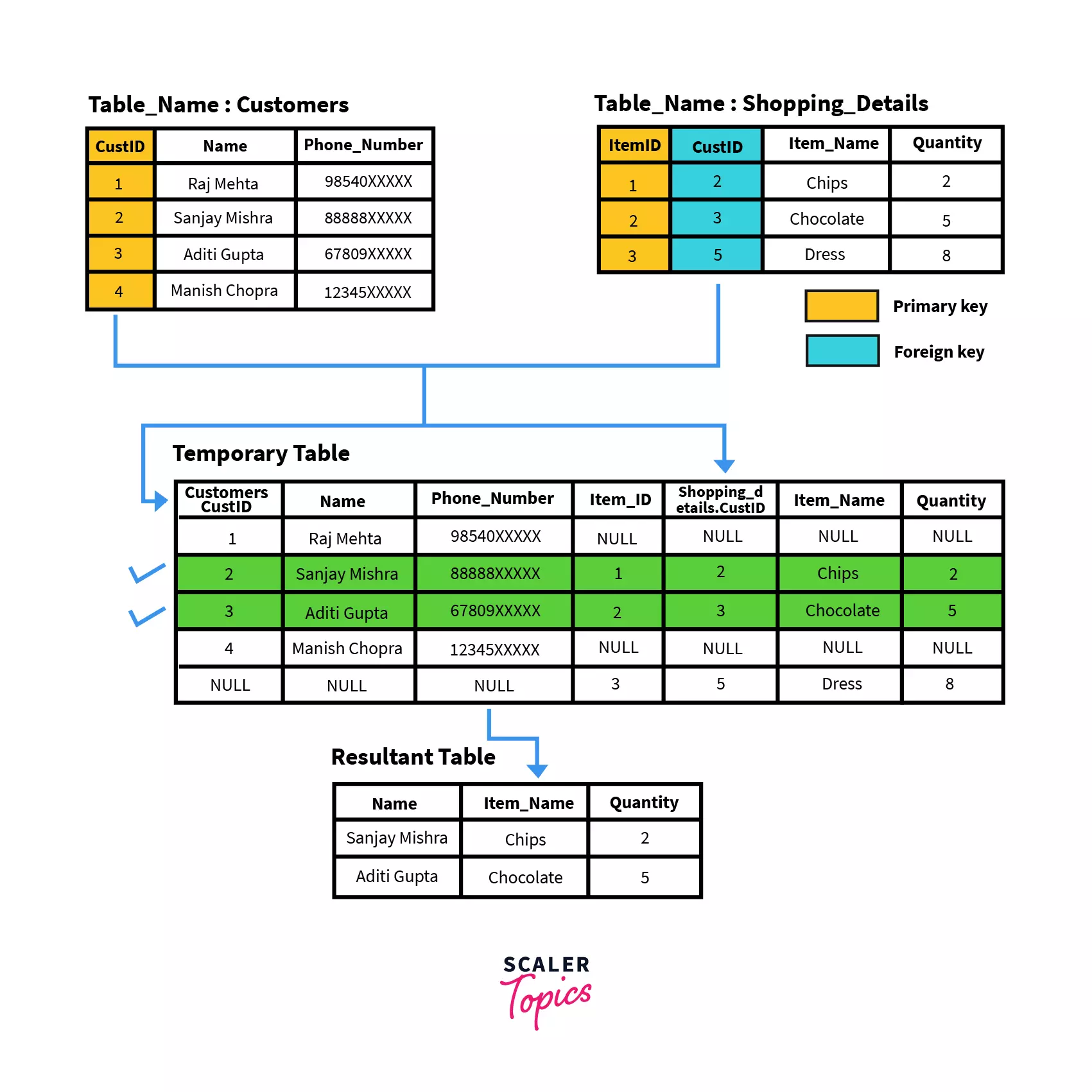
Let’s consider two tables of a supermarket set-up. The first table named Customers gives us information about different customers, i.e., their customer id, name, and phone number. Here, CustID is the primary key that uniquely identifies each row. The second table, named Shopping_Details, gives us information about items bought by customers, i.e., item id, customer id (referencing the customer that bought the item), item name, and quantity.
Problem Statement
Write a query to get all the customers who have bought items from the store. Display their name, item bought, and quantity.
Query
SELECT Customers.Name, Shopping_Details.Item_Name, Shopping_Details.Quantity
FROM Customers INNER JOIN Shopping_Details
WHERE Customers.ID==Shopping_Details.ID;

 275409




Special Case of INNER JOIN: NATURAL JOIN
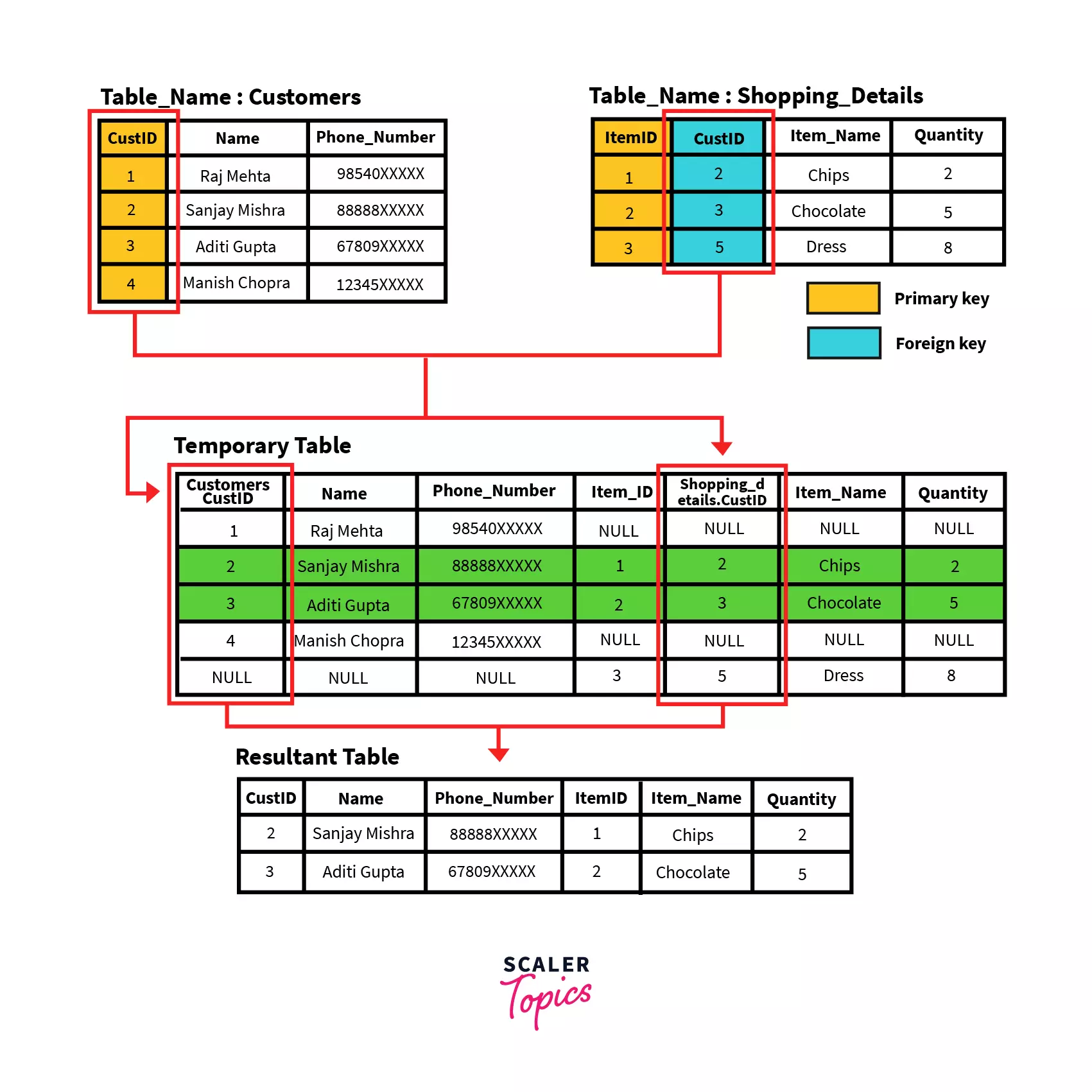
SQL Natural Join is a type of Inner join based on the condition that columns having the same name and datatype are present in both the tables to be joined.
General Syntax
SELECT * FROM
table-1 NATURAL JOIN table-2;
Example
Let’s consider two tables of a supermarket set-up. The first table named Customers gives us information about different customers, i.e., their customer id, name, and phone number. Here, CustID is the primary key that uniquely identifies each row. The second table, named Shopping_Details gives us information about items bought by customers, i.e., item id, customer id (referencing the customer that bought the item), item name, and quantity.
Problem Statement
Write a query to find all details of customers who bought something from the store.
Query
SELECT *
FROM Customers NATURAL JOIN Shopping_Details;

Which SQL join type is based on the condition that columns with the same name and datatype exist in both tables to be joined?
When to Use What?
SQL is an essential skill for people looking for Data Engineering, Data Science, and Software Engineering Roles. Joins in SQL is one of the advanced SQL concepts and is often asked in interviews. These questions do not directly state what SQL join to use. Hence, we need to use a four-step analysis before we start forming our SQL query.
- Identification: Identify tables relating to the problem statement. We also need to identify relations between these tables, the order in which they are connected, and primary and foreign keys.
Example: Let’s say we have Tables A and B. Table A and Table B share a relation of Employee Details – Department Details. Table A has three fields – ID, Name, and DeptID. Table B has two fields – DeptID and DeptName. Table A has a primary key ID, and Table B’s primary key is DeptID. Table A and Table B are connected with the foreign key in Table A, i.e., Table B’s primary key, DeptID.
- Observe: Observe which join will be most suitable for the scenario. This means it should be able to retrieve all the required columns and have the least number of columns that need to be eliminated by the condition.
Example: If all values of Table A are required irrespective of the condition depending on Table C, we can use a left outer join on A and C.
- Deconstruction: Now that we have all requirements to form our query, firstly, we need to break it into sub-parts. This helps us form the query quicker and make our understanding of the database structure quicker. Here, we also form the conditions on the correctly identified relationships.
Example: You need to present data from Table A and Table B. But Table A’s foreign key is Table C’s primary key which is Table B’s foreign key. Hence breaking down the query into results from Table B and C (let’s say Temp) and then common results between its Temp and Table A will give us the correct solution.
- Compilation: Finally, we combine all the parts and form our final query. We can use query optimization techniques like heuristic optimization, resulting in quicker responses.
Let’s take a look at some interview questions based on SQL Joins:
- Write a query in SQL to find the names of departments where more than two employees are working. Sample Table: emp_dept
| dpt_code | dpt_name |
|---|---|
| 57 | Sales |
| 63 | Finance |
| 47 | HR |
Sample Table: emp_details
| emp_id | emp_fname | emp_lname | emp_dpt |
|---|---|---|---|
| 1001 | Jim | Halpert 57 | 57 |
| 1002 | Kevin | Malone | 63 |
| 1003 | Dwight | Shrute | 57 |
How Scaler Transformed Careers in Different Fields
 Google
 Amazon
 Microsoft
 Flipkart
 Adobe1200+ more
Solution
Query
SELECT emp_dept.dpt_name
FROM emp_details
INNER JOIN emp_dept
ON emp_dept = dpt_code
GROUP BY emp_department.dpt_name
HAVING COUNT(*) > 2;
Output:
dpt_name
Sales












Explanation
Since the question directly gives a single condition that we can directly execute without any loopholes, we directly link both tables using an INNER JOIN.
- Write a SQL statement to make a list in ascending order of the salesmen who work either for one or more customers or not yet join under any of the customers.
Sample Table: customers
| cust_id | cust_name | city | salesman_id |
|---|---|---|---|
| 101 | Nick Rimando | New York | 648 |
| 102 | Brad Davis | Scranton | 271 |
| 103 | Graham Zusi | Atlanta | 271 |
| 104 | Julian Green | New York | 648 |
Sample Table: salesman
| salesman_id | salesman_name | city |
|---|---|---|
| 648 | Jim Halpert | New York |
| 271 | Dwight Shrute | Scranton |
| 017 | Pam Beesly | Scranton |
Solution:
Query:
SELECT a.cust_name,a.city,b.name AS "Salesman", b.city
FROM customer a
RIGHT OUTER JOIN salesman b
ON b.salesman_id=a.salesman_id
ORDER BY b.salesman_id;
Output:
| cust_name | city | Salesman | city |
|---|---|---|---|
| NULL | NULL | Pam Beesly | Scranton |
| Brad Davis | Scranton | Dwight Shrute | Scranton |
| Graham Zusi | Atlanta | Dwight Shrute | Scranton |
| Nick Rimando | New York | Jim Halpert | New York |
| Julian Green | New York | Jim Halpert | New York |
Turn Learning into Career Growth
Explanation:
This question states, “one or more customers or not yet join under any of the customers”. If it was “one or more customers” only, we could have directly executed the condition using an INNER JOIN. But, the “or not yet” creates the demand of a complex condition formation. To avoid this complexity, we can think of the resultant table by using a RIGHT OUTER JOIN where we will only have to form the condition of the “one or more” statement, and the “or not yet” results will be added as part of the RIGHT OUTER JOIN.


No comments:
Post a Comment